Showing posts with label agua. Show all posts
Showing posts with label agua. Show all posts
Sunday, September 4, 2016
MyPhone Agua Rio v2 Firmware Download Link
MyPhone Agua Rio v2 Firmware Download Link
You need this firmware/stock rom if you have encountered this kind of problem in your phone.Listed Below
1.Hang in logo
2.Rebooting
3.Bootloop
4.Dead Phone But detected in PC
Some firmware files may be zipped. Please use either WinRAR or 7-Zip to extract. If a firmware file has been divided into multiple parts, use either program to combine into a single file.


1.Hang in logo
2.Rebooting
3.Bootloop
4.Dead Phone But detected in PC
Some firmware files may be zipped. Please use either WinRAR or 7-Zip to extract. If a firmware file has been divided into multiple parts, use either program to combine into a single file.
Downloads:
MyPhone Agua Rio v2 Firmware
updated no password
VCom Drivers
Drivers Auto Installer
Sp Flash Tools
Sp Flash Tools
After finish downloading all files put in one folder in desktop to easily navigate the files.
If you using Window 7 OS
Connect your phone in PC using Micro USB Cable in turn-off mode and open Drivers Auto Installer and run the install-window batch file.Like shown in the image.


3. If the driver is successfully installed MediaTek DA USB VCOM will appear in the New Hardware Wizard...
VCom Drivers
Drivers Auto Installer
Sp Flash Tools
Sp Flash Tools
After finish downloading all files put in one folder in desktop to easily navigate the files.
Installing Drivers
First thing first,Before you can flash/install rom in your phone you must secure first that your phone is detected in your PC.If you using Window 7 OS
Connect your phone in PC using Micro USB Cable in turn-off mode and open Drivers Auto Installer and run the install-window batch file.Like shown in the image.
The drivers will automatically installed in your PC.
If You using Window XP
Connect your phone in PC using Micro USB Cable in turn-off mode while pressing Volume Up or Volume Down.This will detect and look for the driver.
1. This is the first time that you will connect your phone and it will search for the correct driver.
2. Check include this location ... ... and click on browse. Look for USB VCOM Driver and Click on 2K_XP_COM folder if you are using Windows XP or Win7 for Windows 7 and then press OK when you are done picking the right folder for the driver.
Flashing/Install new Firmware/Stock ROM
1.Open Sp Flash tool
2.Click Scatter-loading and browse for MT6572_Android_scatter
3.Now,Click Download and connect your phone while power off.
4.When successfully connected the progress bar will run and change it colors and wait until you dialog window saying Download Ok.
Some workarounds:
If you encounter PMT_Changed error here is what you do:
In Older Version of FlashTool
Load the scatter file
Click in Format (a new menu will popup)
Make sure that you select Format whole flash except bootloader then press OK
Connect your phone in bootmode (Turn off your device then hold Volume UP or VOLUME DOWN then insert USB)
It should detect your phone and continue to flash.
Then Click Download to fully flash your phone.
Hard Reset your phone after flashing.
In Latest version of Flashtool
Load the scatter file
Choose Format + Download (Underneath Scatter-loading file)
Then Click Download and wait until it is done flashing
For Invalid IMEI:
Your Phone/Tablet must be rooted first
Restore yong IMEI in MTKDroidTools version 2.5.3. You will have this error when you format your phone in Flashtool as I had experienced. To restore download MTKDroidTools version 2.5.3 After you extract the file. Open the green robot, you must enable the usb debugging in your phone. It is usually located in Settings>Devoloper Mode then look for usb debugging. After enabling it. Connect your phone in your computer then in MTKDroidTool click on ROOT. Wait for it to finish, then Click in IMEI/NVRAM, input 15 number in each box. Then click REPLACE. Then click Reboot or you can manually turn off your phone. Then turn your phone on again. You can see that you have fully restored your IMEI.
Dont Forget to like us on Facebook and Follow us on Google+
Available link for download

Thursday, September 1, 2016
MyPhone Agua Rio Lite S4700 Firmware Download Link
MyPhone Agua Rio Lite S4700 Firmware Download Link
 |
| MyPhone Agua Rio Lite S4700 |
My Phone Agua Rio Lite S4700 Firmware
I wanna share here the firmware of this My Phone Agua Rio Lite S4700.You might need this if you experiencing something wrong in program of your phone like bootloop,freezes and hangs or worse case scenario your phone not booting at all or what we called softbricked or bricked.
If Above mention is your problem.You are in the right place because I wanna share here what you looking for.You can Download all you need in the Below post..
Download this:
My Phone Agua Rio Lite S4700 Firmware
Sp Flash Tools
Flash it using Sp Flash Tool,Heres How to:
1.Open Sp flash Tool
2.Click Scatter Loading and browse the MT6582_Android_scatter_emmc
3.Then Click Download
4.Hold Volume Down and Connect USB to Phone
5.Wait until Finish Flashing
Disclaimer:Always Do at your Own Risks!
Available link for download
Saturday, August 27, 2016
MyPhone Agua Rio Fun V2 and MyPhone Agua Rio Fun V1 Tested Firmware Download Links
MyPhone Agua Rio Fun V2 and MyPhone Agua Rio Fun V1 Tested Firmware Download Links
I made this tutorial for those who have encountered Rio fun v2 with software related problems that doesnt continue on flashing or has an error on red progress bar or in yellow progress bar...pls follow the exact procedures below,most of us is using only the option "format all+download" and still the error is not fix.. you all have to take note that format all is way to different with the option forcely erased and physically format when downloading flash.
Enter folder “SP_Flash_Tool_exe_windows_v5.1424.00”, run flashtool.exe As the picture shows , select file MTK_AllInOne_DA.bin under folder SP_Flash_Tool_exe_windows_v5.1424.00 for Download Agent?and scatter file in the software package for Scatter-loading
Select Format option?press CTRL+ALT+V to enter advanced mode?select format whole flash and Forcedly Erase.Like shown in the image.
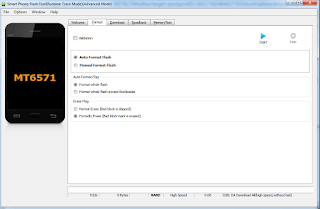
Enter Options?select download menu?select Physical Format/ Readback?then close this window?press Start button?connect USB cable to your phone?power off or take out battery??it’ll format your phone automatically.
After format your phone, you can go to download screen and download software to your phone.
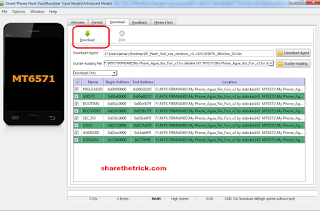
load firmware file,and click Download..disconnect the cable from phone,remove battery,then insert again,insert cable....wait till finished!!
Downloads:
MyPhone Agua Rio Fun V2
MyPhone Agua Rio Fun V1
Thanks to the original uploader dabskie of gsmsandwich
Enter folder “SP_Flash_Tool_exe_windows_v5.1424.00”, run flashtool.exe As the picture shows , select file MTK_AllInOne_DA.bin under folder SP_Flash_Tool_exe_windows_v5.1424.00 for Download Agent?and scatter file in the software package for Scatter-loading
Select Format option?press CTRL+ALT+V to enter advanced mode?select format whole flash and Forcedly Erase.Like shown in the image.
Enter Options?select download menu?select Physical Format/ Readback?then close this window?press Start button?connect USB cable to your phone?power off or take out battery??it’ll format your phone automatically.
After format your phone, you can go to download screen and download software to your phone.
load firmware file,and click Download..disconnect the cable from phone,remove battery,then insert again,insert cable....wait till finished!!
Downloads:
MyPhone Agua Rio Fun V2
MyPhone Agua Rio Fun V1
Thanks to the original uploader dabskie of gsmsandwich
Available link for download
Subscribe to:
Posts (Atom)