Showing posts with label links. Show all posts
Showing posts with label links. Show all posts
Wednesday, September 7, 2016
iOS 8 2 Released IPSW Download Links
iOS 8 2 Released IPSW Download Links
iOS 8.2 Release Notes
Here are the release notes for iOS 8.2, verbatim from the notes that accompany the download in the Settings app:This release introduces support for Apple Watch, and also includes improvements to the Health app, increased stability and bug fixes.
Apple Watch support
• New Apple Watch app to pair and sync with iPhone, and to customize watch settings
• New Activity app for viewing fitness data and achievements from Apple Watch; appears when Apple Watch is paired
• Available on iPhone 5 and later
Health app improvements
• Adds the ability to select the unit of measurement for distance, body temperature, height, weight and blood glucose
• Improves stability when dealing with large amounts of data
• Includes the ability to add and visualize workout sessions from 3rd-party apps
• Addresses an issue that may have prevented users from adding a photo in Medical ID
• Fixes units for vitamins and minerals
• Fixes an issue where Health data wouldn’t refresh after changing data source order
• Fixes an issue where some graphs showed no data values
• Adds a privacy setting that enables turning off tracking of steps, distance and flights climbed
Stability enhancements
• Increases stability of Mail
• Improves stability of Flyover in Maps
• Improves stability of Music
• Improves VoiceOver reliability
• Improves connectivity with Made for iPhone Hearing Aids
Bug fixes
• Fixes an issue in Maps that prevented navigating to some favorite locations
• Addresses an issue where the last word in a quick reply message wasn’t autocorrected
• Fixes an issue where duplicate iTunes purchased content could prevent iCloud restore from completing
• Resolves an issue where some music or playlists didn’t sync from iTunes to the Music app
• Fixes an issue where deleted audiobooks sometimes remained on device
• Resolves an issue that could prevent call audio from routing to car speakers while using Siri Eyes Free
• Fixes a Bluetooth calling issue where no audio is heard until the call is answered
• Fixes a timezone issue where Calendar events appear in GMT
• Addresses an issue that caused certain events in a custom recurring meeting to drop from an Exchange calendar
• Fixes a certificate error that prevented configuring an Exchange account behind a third-party gateway
• Fixes an issue that could cause an organizer’s Exchange meeting notes to be overwritten
• Resolves an issue that prevented some Calendar events from automatically showing as ‘Busy’ after accepting an invite
For information on the security content of this update, please visit this website:
http://support.apple.com/kb/HT1222
 |
| iOS 8.2 Update |
OS 8.2 IPSW Download Links
For advanced users who prefer to install iOS updates through IPSW firmware files, you can download the latest versions of appropriate firmware for iPhone, iPad, and iPod touch from the links below. These are hosted directly on Apple Servers, for best results right-click and choose “Save As”, be sure the file has a .ipsw extension.
iPhone
iPhone 6
iPhone 6 Plus
iPhone 5S CDMA
iPhone 5S GSM
iPhone 5 CDMA
iPhone 5 GSM
iPhone 5C CDMA
iPhone 5C GSM
iPhone 4S
iPad
iPad Air 2 6th gen Wi-Fi
iPad Air 2 6th gen LTE Cellular
iPad Air 5th gen LTE Cellular
iPad Air 5th gen Wi-Fi
iPad Air 5th gen CDMA
iPad Mini 3 China
iPad Mini 3 Wi-Fi
iPad Mini 3 LTE Cellular
iPad 3 Wi-Fi 3rd gen
iPad 3 LTE Cellular GSM
iPad Mini CDMA
iPad Mini GSM
iPad Mini Wi-Fi
iPad Mini 2 LTE Cellular
iPad Mini 2 Wi-Fi
iPad Mini 2 CDMA
iPad 4th gen CDMA
iPad 4th gen GSM
iPad 4th gen Wi-Fi
iPad 3 Cellular CDMA
iPad 2 Wi-Fi 2,4
iPad 2 Wi-Fi 2,1
iPad 2 3G GSM
iPad 2 3G CDMA
iPod Touch
iPod Touch 5th gen
Installing and updating iOS through IPSW requires the usage of iTunes.
Available link for download

Sunday, September 4, 2016
Download iOS 9 1 Links For iPhone iPad iPod touch
Download iOS 9 1 Links For iPhone iPad iPod touch

iOS 9.1 download IPSW links:
- iPad Pro (WiFi)
- iPad Pro (Cellular)
- iPad Air 2 (6th generation WiFi)
- iPad Air 2 (6th generation Cellular)
- iPad Air (5th generation Cellular)
- iPad Air (5th generation WiFi)
- iPad Air (5th generation China)
- iPad (4th generation CDMA)
- iPad (4th generation GSM)
- iPad (4th generation WiFi)
- iPad mini (CDMA)
- iPad mini (GSM)
- iPad mini (WiFi)
- iPad mini 2 (Cellular)
- iPad mini 2 (WiFi)
- iPad mini 2 (China)
- iPad mini 3 (China)
- iPad mini 3 (WiFi)
- iPad mini 3 (Cellular)
- iPad mini 4 (WiFi)
- iPad mini 4 (Cellular)
- iPad 3 Wi-Fi (3rd generation)
- iPad 3 Wi-Fi + Cellular (GSM)
- iPad 3 Wi-Fi + Cellular (CDMA)
- iPad 2 Wi-Fi (Rev A)
- iPad 2 Wi-Fi
- iPad 2 Wi-Fi + 3G (GSM)
- iPad 2 Wi-Fi + 3G (CDMA)
- iPhone 5 (CDMA)
- iPhone 5 (GSM)
- iPhone 5c (CDMA)
- iPhone 5c (GSM)
- iPhone 5s (CDMA)
- iPhone 5s (GSM)
- iPhone 6
- iPhone 6 Plus
- iPhone 6s
- iPhone 6s Plus
- iPhone 4s
- iPod touch (5th-generation)
- iPod touch (6th-generation)
Available link for download
Saturday, August 27, 2016
MyPhone Agua Rio Fun V2 and MyPhone Agua Rio Fun V1 Tested Firmware Download Links
MyPhone Agua Rio Fun V2 and MyPhone Agua Rio Fun V1 Tested Firmware Download Links
I made this tutorial for those who have encountered Rio fun v2 with software related problems that doesnt continue on flashing or has an error on red progress bar or in yellow progress bar...pls follow the exact procedures below,most of us is using only the option "format all+download" and still the error is not fix.. you all have to take note that format all is way to different with the option forcely erased and physically format when downloading flash.
Enter folder “SP_Flash_Tool_exe_windows_v5.1424.00”, run flashtool.exe As the picture shows , select file MTK_AllInOne_DA.bin under folder SP_Flash_Tool_exe_windows_v5.1424.00 for Download Agent?and scatter file in the software package for Scatter-loading
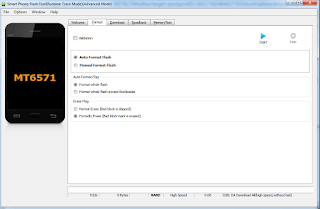
Select Format option?press CTRL+ALT+V to enter advanced mode?select format whole flash and Forcedly Erase.Like shown in the image.
Enter Options?select download menu?select Physical Format/ Readback?then close this window?press Start button?connect USB cable to your phone?power off or take out battery??it’ll format your phone automatically.
After format your phone, you can go to download screen and download software to your phone.
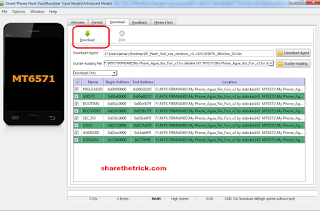
load firmware file,and click Download..disconnect the cable from phone,remove battery,then insert again,insert cable....wait till finished!!
Downloads:
MyPhone Agua Rio Fun V2
MyPhone Agua Rio Fun V1
Thanks to the original uploader dabskie of gsmsandwich
Enter folder “SP_Flash_Tool_exe_windows_v5.1424.00”, run flashtool.exe As the picture shows , select file MTK_AllInOne_DA.bin under folder SP_Flash_Tool_exe_windows_v5.1424.00 for Download Agent?and scatter file in the software package for Scatter-loading
Select Format option?press CTRL+ALT+V to enter advanced mode?select format whole flash and Forcedly Erase.Like shown in the image.
Enter Options?select download menu?select Physical Format/ Readback?then close this window?press Start button?connect USB cable to your phone?power off or take out battery??it’ll format your phone automatically.
After format your phone, you can go to download screen and download software to your phone.
load firmware file,and click Download..disconnect the cable from phone,remove battery,then insert again,insert cable....wait till finished!!
Downloads:
MyPhone Agua Rio Fun V2
MyPhone Agua Rio Fun V1
Thanks to the original uploader dabskie of gsmsandwich
Available link for download
iPhone iPad iPod touch iOS 9 3 2 IPSW Download Links Here
iPhone iPad iPod touch iOS 9 3 2 IPSW Download Links Here

Apple has launched iOS 9.3.2 for the iPhone, iPad, and iPod touch. The brand new firmware model options malicious program fixes and function enhancements.
What is New In This Model:
? Fixes a subject matter the place come Bluetooth equipment may just revel in audio high quality problems while paired to the iPhone SE
? Fixes a subject matter the place taking a look up dictionary definitions may just fail
? Addresses a topic that avoided typing e mail addresses while the use of the Eastern Kana keyboard in Mail and Messages
? Fixes a subject matter for Voice Over customers the use of Alex voice, the place the software switches to another voice to announce punctuation or paces
? Fixes a topic that avoided MDM servers from putting in Customized B2b apps
? Fixes a subject matter the place come Bluetooth equipment may just revel in audio high quality problems while paired to the iPhone SE
? Fixes a subject matter the place taking a look up dictionary definitions may just fail
? Addresses a topic that avoided typing e mail addresses while the use of the Eastern Kana keyboard in Mail and Messages
? Fixes a subject matter for Voice Over customers the use of Alex voice, the place the software switches to another voice to announce punctuation or paces
? Fixes a topic that avoided MDM servers from putting in Customized B2b apps
iPhone 6S
iPhone 6S Plus
iPhone SE
iPhone 6
iPhone 6 Plus
iPhone 5C CDMA
iPhone 5C GSM
iPhone 5S CDMA
iPhone 5S GSM
iPhone 5 GSM
iPhone 5 CDMA
iPhone 4S
iPad Professional 12 inch
iPad Professional 12 inch Mobile Type
iPad Professional 9 inch
iPad Professional 9 inch Mobile Type
iPad Air 2
iPad Air 2 Mobile style
iPad Air 4,2 Mobile style
iPad Air 4,1
iPad Air 4,3 China style
iPad 4 CDMA
iPad 4 GSM
iPad 4
iPad 3 GSM
iPad 3 CDMA
iPad 3
iPad 2 2,4
iPad 2 2,1
iPad 2 GSM
iPad 2 CDMA
iPad Mini CDMA
iPad Mini GSM
iPad Mini
iPad Mini 2 Mobile Type
iPad Mini 2
iPad Mini 2 4,6 China
iPad Mini 3 4,9 China
iPad Mini 3
iPad Mini 3 Mobile Style
iPad Mini 4
iPad Mini 4 Mobile Type
iPod Touch fifth-era
iPod Touch sixth-era
iPhone 6S Plus
iPhone SE
iPhone 6
iPhone 6 Plus
iPhone 5C CDMA
iPhone 5C GSM
iPhone 5S CDMA
iPhone 5S GSM
iPhone 5 GSM
iPhone 5 CDMA
iPhone 4S
iPad Professional 12 inch
iPad Professional 12 inch Mobile Type
iPad Professional 9 inch
iPad Professional 9 inch Mobile Type
iPad Air 2
iPad Air 2 Mobile style
iPad Air 4,2 Mobile style
iPad Air 4,1
iPad Air 4,3 China style
iPad 4 CDMA
iPad 4 GSM
iPad 4
iPad 3 GSM
iPad 3 CDMA
iPad 3
iPad 2 2,4
iPad 2 2,1
iPad 2 GSM
iPad 2 CDMA
iPad Mini CDMA
iPad Mini GSM
iPad Mini
iPad Mini 2 Mobile Type
iPad Mini 2
iPad Mini 2 4,6 China
iPad Mini 3 4,9 China
iPad Mini 3
iPad Mini 3 Mobile Style
iPad Mini 4
iPad Mini 4 Mobile Type
iPod Touch fifth-era
iPod Touch sixth-era
Available link for download
Wednesday, August 24, 2016
iOS 8 4 Released IPSW Download Links
iOS 8 4 Released IPSW Download Links

Always backup the iOS device to iCloud or iTunes before updating system software.
Download & Install iOS 8.4
The simplest way to download and install iOS 8.4 is through the Software Update mechanism on the iPhone, iPad, or iPod touch.
Open Settings, go to “General”, then go to “Software Update”
Choose “Download and Install” when the iOS 8.4 update becomes available
Users can also choose to install the update through iTunes and a computer, or manually with firmware files. However you choose to install iOS 8.4, do not forget to back up the device beforehand.
iOS 8.4 IPSW Direct Download Links
Direct download links to iOS 8.4 IPSW firmware files are included below, right-click and choose “Save As” and be sure the file has a .ipsw file extension when saving. Using IPSW files to update is not particularly complicated, but it is generally best reserved for advanced users.
Downloads:
iPhone 6 PlusiPhone 6
iPhone 5s – GSM
iPhone 5s – CDMA
iPhone 5 – CDMA
iPhone 5 – GSM
iPhone 5c – CDMA
iPhone 5c – GSM
iPhone 4s
iPad Air 2 – Wi-Fi
iPad Air 2 – Cellular
iPad Air – GSM Cellular
iPad Air – Wi-Fi
iPad Air – CDMA
iPad 4 – 4th gen CDMA Cellular
iPad 4 – 4th gen GSM Cellular
iPad 4 – 4th gen Wi-Fi
iPad Mini 3 – Wi-Fi
iPad Mini 3 – Cellular
iPad Mini 3 – (4,9) China model
iPad Mini 2 – Wi-Fi + Cellular
iPad Mini 2 – Wi-Fi
iPad Mini 2 – CDMA
iPad Mini – CDMA
iPad Mini – GSM
iPad Mini – Wi-Fi
iPad 3 Wi-Fi
iPad 3 – GSM
iPad 3 – CDMA
iPad 2 Wi-Fi (2,4)
iPad 2 Wi-Fi (2,1)
iPad 2 – GSM
iPad 2 – CDMA
iPod Touch 5th gen
Most users should update to iOS 8.4 through the OTA software update mechanism.
iOS 8.4 Release Notes
This update introduces Apple Music—a revolutionary music service, 24/7 global radio, and a way for fans to connect with their favorite artists—all included in the redesigned Music app. iOS 8.4 also includes improvements for iBooks and bug fixes.
Apple Music
• Become an Apple Music member to play from millions of songs in the Apple Music catalog, or keep them offline for playback later
• For You: Members can see playlist and album recommendations, handpicked by music experts
• New: Members can find the latest, greatest new music available—direct from our editors
• Radio: Tune in to music, interviews, and exclusive radio shows on Beats 1, play radio stations created by our editors or create your own from any artist or song
• Connect: See shared thoughts, photos, music, and videos from artists you follow, then join the conversation
• My Music: Play from all of your iTunes purchases, songs from Apple Music, and playlists in one place
• Completely redesigned music player that includes new features such as Recently Added, MiniPlayer, Up Next, and more
• iTunes Store: Still the best place to buy your favorite music—one song or album at a time
• Availability and features may vary by country
iBooks improvements and fixes
• Browse, listen and download audiobooks from inside iBooks
• Enjoy the all-new Now Playing feature, designed specifically for audiobooks
• Books that are Made for iBooks now work on iPhone in addition to iPad
• Find and pre-order books in a series right from your library
• Improves accessibility of widgets, glossary and navigation in books made with iBooks Author
• New default Chinese font
• New setting to turn off Auto-Night theme in your library
• Resolves an issue that may have prevented Hide Purchases from working
• Resolves an issue that may have prevented downloading books from iCloud
Other improvements and bug fixes
• Fixes an issue where receiving a specific series of Unicode characters causes device to reboot
• Fixes an issue that prevented GPS accessories from providing location data
• Fixes an issue where deleted Apple Watch apps could re-install
For information on the security content of this update, please visit this website:
http://support.apple.com/kb/HT1222
[Source]
Available link for download
Friday, August 19, 2016
X BO Firmwares Stock ROMs Download Links
X BO Firmwares Stock ROMs Download Links
Heres the firmwares/Stock ROMs of X-BO smartphones which you can use in bricked phones using SP Flash Tools or MultiPortDownloadTool.
Most X-BO smartphones are clones of other products so do not click preloader and uboot in SP Flash Tools when using any of this firmwares (except when the phone is totally bricked).
it a must to fully back-up of uboot.img or ik.img of X-BO phones before flashing any of the stock ROMs.if you end up bad display you can flash back the uboot.img or ik,img file you back-up to fix it.

Downloads:
X-BO B3
Chip-MT6572
DOWNLOAD
X-BO B5
Chip-MT6572
DOWNLOAD
X-BO B9
Chip-MT6572_V1.02
DOWNLOAD
X-BO LION
LION_MT6580_Android5.1
DOWNLOAD
X-BO N760
N760_MT6572_Android4.4
DOWNLOAD
X-BO M3
MT6572
DOWNLOAD
X-BO M8
HTC_M8.CLONE_MT6572_Android4.2
DOWNLOAD
X-BO M9 MINI
M9_MINI_MT6580_Android5.1 Variant 1
DOWNLOAD
M9_MINI_MT6580_Android5.1 Variant 2
DOWNLOAD
X-BO M9+
M9+ Android4,.4
DOWNLOAD
X-BO KIVI 01
KIVI_01_MT6580_Android5.1
DOWNLOAD
X-BO 02
02_MT6580_Android5.1
DOWNLOAD
X-BO 03
03_MT6580_Android5.1
DOWNLOAD
X-BO 05
MT6590
Password:xboo580
DOWNLOAD
X-BO KIVI 06
KIVI_06_MT6580_V1.0.7
DOWNLOAD
KIVI_06_MT6580_Android5.1_V1.0.1
DOWNLOAD
X-BO 07
07_MT6580_Android5.1_V1.0.7
DOWNLOAD
X-BO Q11
SPD6820
DOWNLOAD
X-BO S5
MT6580
DOWNLOAD
X-BO S7
MT6580
DOWNLOAD
X-BO S900
X900_MT6580_Android5.1
DOWNLOAD
X-BO Tiger
MT6580
DOWNLOAD
X-BO V3+
MT6572
DOWNLOAD
X-BO V5
V5_MT6572
DOWNLOAD
X-BO KIVI V5
KIVI_V5_MT6572_Android4,4,2
DOWNLOAD
X-BO V7
MT6572
DOWNLOAD
X-BO V9
V9_MT6582_V1.0.8
DOWNLOAD
X-BO V9+
V9+_MT6582_Android4.4
DOWNLOAD
X-BO V11
MT6572
DOWNLOAD
X-BO V17
MT6572
DOWNLOAD
X-BO KIVI V18
KIVI_V18_MT6572_Android4.4
DOWNLOAD
X-BO X1
MT6580
DOWNLOAD
Some Firmware can be found here>http://www.romkingz.net/2015/11/download-x-bo-smart-phone-stock-roms.html
Most X-BO smartphones are clones of other products so do not click preloader and uboot in SP Flash Tools when using any of this firmwares (except when the phone is totally bricked).
it a must to fully back-up of uboot.img or ik.img of X-BO phones before flashing any of the stock ROMs.if you end up bad display you can flash back the uboot.img or ik,img file you back-up to fix it.
Downloads:
X-BO B3
Chip-MT6572
DOWNLOAD
X-BO B5
Chip-MT6572
DOWNLOAD
X-BO B9
Chip-MT6572_V1.02
DOWNLOAD
X-BO LION
LION_MT6580_Android5.1
DOWNLOAD
X-BO N760
N760_MT6572_Android4.4
DOWNLOAD
X-BO M3
MT6572
DOWNLOAD
X-BO M8
HTC_M8.CLONE_MT6572_Android4.2
DOWNLOAD
X-BO M9 MINI
M9_MINI_MT6580_Android5.1 Variant 1
DOWNLOAD
M9_MINI_MT6580_Android5.1 Variant 2
DOWNLOAD
X-BO M9+
M9+ Android4,.4
DOWNLOAD
X-BO KIVI 01
KIVI_01_MT6580_Android5.1
DOWNLOAD
X-BO 02
02_MT6580_Android5.1
DOWNLOAD
X-BO 03
03_MT6580_Android5.1
DOWNLOAD
X-BO 05
MT6590
Password:xboo580
DOWNLOAD
X-BO KIVI 06
KIVI_06_MT6580_V1.0.7
DOWNLOAD
KIVI_06_MT6580_Android5.1_V1.0.1
DOWNLOAD
X-BO 07
07_MT6580_Android5.1_V1.0.7
DOWNLOAD
X-BO Q11
SPD6820
DOWNLOAD
X-BO S5
MT6580
DOWNLOAD
X-BO S7
MT6580
DOWNLOAD
X-BO S900
X900_MT6580_Android5.1
DOWNLOAD
X-BO Tiger
MT6580
DOWNLOAD
X-BO V3+
MT6572
DOWNLOAD
X-BO V5
V5_MT6572
DOWNLOAD
X-BO KIVI V5
KIVI_V5_MT6572_Android4,4,2
DOWNLOAD
X-BO V7
MT6572
DOWNLOAD
X-BO V9
V9_MT6582_V1.0.8
DOWNLOAD
X-BO V9+
V9+_MT6582_Android4.4
DOWNLOAD
X-BO V11
MT6572
DOWNLOAD
X-BO V17
MT6572
DOWNLOAD
X-BO KIVI V18
KIVI_V18_MT6572_Android4.4
DOWNLOAD
X-BO X1
MT6580
DOWNLOAD
Some Firmware can be found here>http://www.romkingz.net/2015/11/download-x-bo-smart-phone-stock-roms.html
Available link for download
Saturday, August 13, 2016
SKK Glimpse 2 Firmware Download Links
SKK Glimpse 2 Firmware Download Links
Below is the Download link of this phone called SKK Glimpse 2+ which you can use to flash your phone using SP Flash Tool.
Flash the Firmware using SP Flash Tool if your phone stuck on logo and even boot loop situation can fix by using this firmware.
1.Download all necessary files below.(Extract in desktop using Extractor Software)
2.Make sure Drivers of your phone properly installed in your PC
3.Now,Open SP Flash Tool.(see the image)

4.Load Scatter Files by clicking scatter-loading and browse the scatter files where did you put in step 1.

5.Now,Switch to Advance Mode[press Ctrl+Alt+V] and follow what shown in the images.

6.After finish format,Click Download.(as shown in the image)

7.This time,Connect your phone while it is turn-off
8.Wait until flashing Complete
9.There should be a check will come-out after finis flashing and finally check your phone if back to normal now.
Download:
SKK Glimpse 2+ Firmware
Drivers Auto Installer
SP Flash Tool
PASSWORD: mobstar28
Thanks to the original uploader mobstar28 of gsmsandwich.com
[Source]
Flash the Firmware using SP Flash Tool if your phone stuck on logo and even boot loop situation can fix by using this firmware.
Instructions:
1.Download all necessary files below.(Extract in desktop using Extractor Software)
2.Make sure Drivers of your phone properly installed in your PC
3.Now,Open SP Flash Tool.(see the image)
4.Load Scatter Files by clicking scatter-loading and browse the scatter files where did you put in step 1.
5.Now,Switch to Advance Mode[press Ctrl+Alt+V] and follow what shown in the images.
6.After finish format,Click Download.(as shown in the image)
7.This time,Connect your phone while it is turn-off
8.Wait until flashing Complete
9.There should be a check will come-out after finis flashing and finally check your phone if back to normal now.
Download:
SKK Glimpse 2+ Firmware
Drivers Auto Installer
SP Flash Tool
PASSWORD: mobstar28
Thanks to the original uploader mobstar28 of gsmsandwich.com
[Source]
Available link for download
Friday, August 12, 2016
Lenovo A390 Lenovo A516 Firmware Download Links
Lenovo A390 Lenovo A516 Firmware Download Links
I want to share this firmware which I use to revive two Lenovo Smartphone.This firmware I want to share is definitely will work on Software problem like phone freezes,hangs,rebooting and hang in logo or hang in android logo.
Flash this firmware using SP Flash Tool.
Downloads:
Lenovo A390 Firmware
Lenovo A516 Firmware
VCom Drivers
Drivers Auto Installer
Sp Flash Tools
Sp Flash Tools
Note:Some firmware files may be zipped. Please use either WinRAR or 7-Zip to extract. If a firmware file has been divided into multiple parts, use either program to combine into a single file.
2. Open SP_Flash_Tool_v3.1316.0.150 folder, install Flash_tool.exe
3. Inside flash tool, click Scatter-loading choose A516_ROW_S120_140228 folder, then open "target_bin" folder, double click on "MT6572_Android_scatter.txt" and wait for flash tool to load target it self.
4. Check "DA DL All With Check Sum"
5. Click "Firware Upgrade" button, wait till it finish loading.
Do not tick Preloader, leave it uncheck!!
6. Turn off your phone, unplug the battery.
6. Connect your phone to USB socket with cable data
7. Wait the flash process finish about 7 minutes untill the green circle appear.
8. Turn on your phone and thats all.
Flash this firmware using SP Flash Tool.
 |
| SP Flash Tool after finish flashing |
Lenovo A390 Firmware
Lenovo A516 Firmware
VCom Drivers
Drivers Auto Installer
Sp Flash Tools
Sp Flash Tools
Note:Some firmware files may be zipped. Please use either WinRAR or 7-Zip to extract. If a firmware file has been divided into multiple parts, use either program to combine into a single file.
How to Flash Lenovo A516
1. Extract the rar archives and put A516_ROW_S120_140228 folder on desktop.2. Open SP_Flash_Tool_v3.1316.0.150 folder, install Flash_tool.exe
3. Inside flash tool, click Scatter-loading choose A516_ROW_S120_140228 folder, then open "target_bin" folder, double click on "MT6572_Android_scatter.txt" and wait for flash tool to load target it self.
4. Check "DA DL All With Check Sum"
5. Click "Firware Upgrade" button, wait till it finish loading.
Do not tick Preloader, leave it uncheck!!
6. Turn off your phone, unplug the battery.
6. Connect your phone to USB socket with cable data
7. Wait the flash process finish about 7 minutes untill the green circle appear.
8. Turn on your phone and thats all.
Available link for download
Subscribe to:
Posts (Atom)