Showing posts with label z. Show all posts
Showing posts with label z. Show all posts
Saturday, September 10, 2016
Download Stock Firmware Sony Xperia Z Ultra C6388 C6802
Download Stock Firmware Sony Xperia Z Ultra C6388 C6802
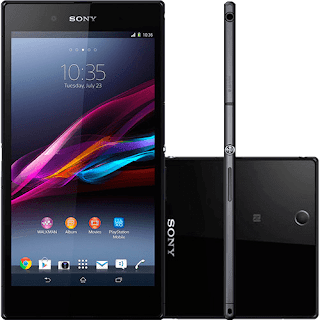
Sony Xperia Z Ultra device model C6802 :
- C6802_ID_1276-0098_14.2.A.0.290_R3B (Link download)
- C6802_ID_1275-9902_14.5.A.0.270_R2D (Link download)
Sony Xperia Z Ultra device model C6833 :
- C6833_ID_1275-9902_14.5.A.0.242_R2D (Link download)
- C6833_ID_1275-9902_14.5.A.0.270_R2D (Link download)
Available link for download

Sunday, September 4, 2016
Fix Soft Brick On Sony Xperia Z Ultra Easily
Fix Soft Brick On Sony Xperia Z Ultra Easily
 |
| Fix Soft Brick On Sony Xperia Z Ultra Easily |
AnyIndo - In this article we are going to share an article it is Fix Soft Brick On Sony Xperia Z Ultra Easily. As we know Sony Xperia Z Ultra is one the latest Android devices which launched on 2013. It has the size 6.3’’ fuu HD display, this device could certainly be considered a phablet as its size. This device powered by a quad core 2.2GHz Qualcom Processor, Adreno 330 GPU, 2 GB RAM and has LTE 4G connectifity.
Not just that, Sony Xperia Z Ultra certified with IP58, it means dust and water proof and water resistant to 1 meter in 30 minutes. There is 8 MP on camera, 16 GB of internal storage and it runs on a large 3050mAh battery.
All what we want to discuss in this article is not about its specification but how to fix soft brick on Sony Xperia Z Ultra easily. Soft brick is an android problem that causes your Xperia Z Ultra stucks on Sony logo and you don’t even can do anything or open menu on your device. This would be annoying problem ever for android user especially Xperia Z Ultra user.
Sometimes it says wont go into recovery when you want to fix it through Recovery method, everyone reported that the button mix or that one none work at all. There is a question “what’s real FFFF button I need to recovery if the button doesn’t work?’’
Okay, here we are the problem is recognized . Let’s follow the simplest method to fix that , because this method is indeed simple as well:
Steps:
- You have to find the flashtool
- Get the drivers of Sony Xperia Z Ultra
- Find a firmware
- And then flash your Xperia Z Ultra tih the tool and voila
- Done
That’s all about Fix Soft Brick On Sony Xperia Z Ultra. If you have any question related to this article you can leave comment bellow and if we are not busy we would like to reply and soon as possible to solve your problem together.
Note:
Cause in this moment i am little bit busy, I cant help you in detail how to fix this soft brick. But trust me, by following and finding what this article above you can fix soft brick on your Xperia Z Ultra. In Another chance I would help you to give in detail to fix soft brick on your Xperia Z Ultra
Available link for download
Monday, August 29, 2016
Download Game Dragon Ball Z Shin Bodukai 2 MOD for Android
Download Game Dragon Ball Z Shin Bodukai 2 MOD for Android
 |
| Download Game Dragon Ball Z Shin Bodukai 2 MOD for Android |
Dragon Ball Z is a kind of popular anime in the world from Japan, and mostly men have watched this anime on TV. Nowadays Dragon Ball Z is not just on anime but this is a video game based on fighting mode with many fans in the world. In this version, Dragon Ball Z Shin Bodukai is second of Dragon Ball Z that released on Play Station (PSP). It was released in 2007 and developed by Dimps Studio and most of Dragon Ball games are inspired by Dragon Ball movie or its anime.
About game mode, this game tells us about Trunks world and its adventure to fight against The Majin Buu. In this game you can choose to be a hero character or a enemy and with that feature you can also play it with the fast movement and this give would give you the best experience to play. There are more than 50 skills to fight and there are level system that helps you to mod the story. Lets download and play this game:
Screenshots:
 |
| screenshot 1 |
 |
| screenshot 2 |
 |
| screenshot 3 |
File:
Dragon Ball Z Shin Bodukai (361 MB) - Download
Dragon Ball Z Shin Bodukai (362 MB) - Download
Save Data - Download
Available link for download
Wednesday, August 17, 2016
Custom ROM Xperia Flipper Z For Smartfren Andromax G
Custom ROM Xperia Flipper Z For Smartfren Andromax G
 |
| Custom ROM Xperia Flipper Z For Smartfren Andromax G |
AnyIndo – In this article we are going to share an article it is Custom ROM Xperia Flipper Z For Smartfren Andromax G. For long time ago we didn’t focus to share tutorial about custom ROM because we still focus to focus about root, unrott, cwm and more. But in this session we will guide you to install this custom ROM.
According to our review, this custom ROM has 90% display like Sony Xperia, and if you are so curious to this custom ROM you can follow our instruction bellow:
 |
| Custom ROM Xperia Flipper Z For Smartfren Andromax G |
Steps 1:
- Download ROM above and put it on SD Card
- Go to CWM
- Wipe data
- Wipe cache
- Advance > Wipe Dalvik cache
- Install zip from SD Card and choose ROM file
- Wait until the process is done
Steps 2:
- In this step, we are going to install Xperia Lockscreen, so:
- Download Frameworks file and put it on SD Card
- Rename its name tobe framework.apk
- Go to system/framework folder
- Copy and paste there
- Wait, it will automatically reboot your device
- If touchscreen feels messy, just flashing the lockscreen
A method to change picture on About Phone Settings:
- Go to root explorer
- Go to system/app
- Find setting.apk, extract that file
- Go to exctracted
- Go to res/anim folder
- There is cosmic.png file, change it as you wish as long as its format is “png”. We mean it png picture. But remember that the size isn’t bigger than cosmic file.
- Zip once again that folder
- Rename it to be apk
- Push to system/app
- Reboot your device
Note:
- This ROM isn’t supported with Dolby. If you want Dolby on your Andromax G, you can find it in another custom ROM
- This ROM supported with its Effect Audio
- This ROM supports GL Tool to play game, download click here
File:
Custom Rom Xperia Flipper Z – Download
Xperia Lockscreen - Download
Available link for download
Saturday, August 13, 2016
Cara Flash Firmware FTF Sony Xperia Z C6602
Cara Flash Firmware FTF Sony Xperia Z C6602

Tutorial Flash Sony Xperia Z C6602 Terbaru menggunakan flashtool. karena masalah kerusakan software seperti terkena virus, kesalahan rooting, download Aplikasi error, loading bootloop hingga mati total, HardBrick dan berbagai kerusakan software lainya bisa Dilakukan update Firmware ftf menggunakan flashtool selama sony xperia kamu masih bisa terdeteksi di usb sony pc companion atay di driver computer yang telah terpasang. tipe ini sanggat banyak sekali mengalami kerusakan connector usb di sebabkan karena papan pcb-nya yang terlalu tipis atau bisa kerena charger bad.
Di bawah ini kamu akan menemukan tutorial update firmware terbaru untuk ponsel Sony Xperia Z C6602 Langsung saja berikut ini :
- Cara Flash Android terbaru untuk Sony Xperia Z C6602
- Pertama-tama , periksa versi firmware Anda ( jika Anda sudah memiliki yang terbaru , Anda tidak perlu tutorial ini.
- Download dan install Flashtool
- Download Firmware terbaru untuk Sony Xperia Z C6602 Disini atau all stock rom sony disini
- Paste file ftf download di langkah c ) ke folder ” Firmware ” di dalam folder Flashtool
- Buka Flashtool , klik pada flash dan pilih firmware tadi di download , klik ok . Penting – jika Anda tidak ingin menghapus data dari ponsel Anda , cukup hapus tanda centang di userdata.sin Semua data akan tetap berada di telepon Anda , tapi kadang-kadang dapat menyebabkan masalah tambahan. Jadi lebih baik ( dan saya sarankan ) untuk melakukan backup data pribadi Anda , lanjutkan dengan instalasi bersih dan kemudian mengembalikan data pribadi Anda.
- Matikan telepon Anda dan ketika Flashtool menunjukkan pop up window , menghubungkan ponsel ke PC dengan tekan tombol volume bawah sampai Led warna hijau muncul
- Setelah beberapa menit semua dilakukan dan telepon Anda mendapatkan firmware baru
Berikut Tutorial lengkap : How to Flashing Sony Xperia using flashtool
Available link for download
Subscribe to:
Posts (Atom)