Showing posts with label rom. Show all posts
Showing posts with label rom. Show all posts
Saturday, September 10, 2016
X BO V15 Stock Rom Download
X BO V15 Stock Rom Download
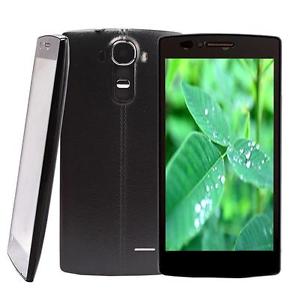
X-BO V15
V15_MT6572_Android4.4
DOWNLOAD
V15_MT6580_Android5.1_V1.0.2
DOWNLOAD
V15_MT6580_Android5.1_V1.0.1
DOWNLOAD
Install ROM:
- Unpack FlashTools, and Click on Flash_tool.exe
- Select "scatter-Loading" and search MT6580_Android_scatter.txt in ROM
- Wait file to be added into Flash Tool
- Select "Download Only" or if upgrade "Firmware upgrade"
- Turn off your phone, remove the battery (if the battery is removable) and replace it after some seconds (and dont turn on the phone).
- Select "scatter-Loading" and search MT6580_Android_scatter.txt in ROM
- Wait file to be added into Flash Tool
- Select "Download Only" or if upgrade "Firmware upgrade"
- Turn off your phone, remove the battery (if the battery is removable) and replace it after some seconds (and dont turn on the phone).
- Press “Download” button to start
- and connect your phone into the computer via USB data cable.
- The process will start and a red progress bar will appear after color purple, yellow.
- And green circles display
- Finish !
- and connect your phone into the computer via USB data cable.
- The process will start and a red progress bar will appear after color purple, yellow.
- And green circles display
- Finish !
- You can now safely disconnect your phone and turn it on.
Available link for download

Friday, September 9, 2016
Download Alcatel One Touch 6030A Idol Stock Rom
Download Alcatel One Touch 6030A Idol Stock Rom

Below
Alcatel One Touch 6030A Idol
Download now
- Download and extract the stock firmware on your computer.
- After extracting you will find the SP Flash Tool, Driver and instruction manual.
- Install the USB Drivers (skip if drivers are already installed).
- Open the SP Flash Tool and load the Scatter File from the firmware folder.
- Connect your Smartphone to the computer using the USB Driver.
- Click on Upgrade / Download Button in the SP Flash Tool to Begin the Flashing.
- Green Ring will appear at the end of successful Flash.
Available link for download
X BO X14 Stock Rom Download
X BO X14 Stock Rom Download

X-BO X14
X14_MT6580_V1.0.3
DOWNLOAD
X14_MT6580_V1.0.2
DOWNLOAD
X14_MT6580_V1.0.1
DOWNLOAD
Install ROM:
- Unpack FlashTools, and Click on Flash_tool.exe
- Select "scatter-Loading" and search MT6580_Android_scatter.txt in ROM
- Wait file to be added into Flash Tool
- Select "Download Only" or if upgrade "Firmware upgrade"
- Turn off your phone, remove the battery (if the battery is removable) and replace it after some seconds (and dont turn on the phone).
- Select "scatter-Loading" and search MT6580_Android_scatter.txt in ROM
- Wait file to be added into Flash Tool
- Select "Download Only" or if upgrade "Firmware upgrade"
- Turn off your phone, remove the battery (if the battery is removable) and replace it after some seconds (and dont turn on the phone).
- Press “Download” button to start
- and connect your phone into the computer via USB data cable.
- The process will start and a red progress bar will appear after color purple, yellow.
- And green circles display
- Finish !
- and connect your phone into the computer via USB data cable.
- The process will start and a red progress bar will appear after color purple, yellow.
- And green circles display
- Finish !
- You can now safely disconnect your phone and turn it on.
Available link for download
Thursday, September 8, 2016
Download Huawei Ascend G510 U0251 Stock Rom
Download Huawei Ascend G510 U0251 Stock Rom

Learn how to flash this device here
Huawei Ascend G510-U0251
Download
Huawei Ascend G510 detailed specificationsGENERAL
Release date April 2013
Form factor Bar
Dimensions (mm) 134.00 x 67.00 x 9.90
Weight (g) 150.00
Battery capacity (mAh) 1750
Removable battery Yes
SAR value NA
DISPLAY
Screen size (inches) 4.50
Touchscreen Yes
Resolution 480x854 pixels
HARDWARE
Processor 1.2GHz dual-core
RAM 512MB
Internal storage 4GB
Expandable storage Yes
Expandable storage type microSD
Expandable storage up to (GB) 32
CAMERA
Rear camera 5-megapixel
Flash Yes
Front camera 0.3-megapixel
Available link for download
Download Tecno Boom J8 Stock Rom
Download Tecno Boom J8 Stock Rom

Download Tecno Boom J8 firmware Below
Learn how to flash/unbrick Tecno J8 boom using sp flash tool form here
TECNO J8 BOOM SPECS.
Android 5.1 (Lollipop) with HiOS
1.3GHz quad-core Processor
MT6735
TECNO J8 STOCK ROM
C8-H354-C1-L-HiOS-20160310
DOWNLOAD NOW
Platform: Android 5.1 (Lollipop), Tecno Hios UI
Processor: 1.3GHz quad-core Processor
GPU: Mali-T720 Graphics
Memory: 2 GB RAM
Colours: Numerous Colours
Dimension: –
Weight: –
SIM Type: –
SIM Count: Dual SIM, Dual Standby
Display
Display: 5.5-inch Touch Display, 720 x 1280 pixels (267ppi)
Display Protection: –
Camera
Rear Camera: 13 MP Camera, Video
Rear Camera Features: LED Flash, Autofocus
Front Camera: 5 MP Camera
Storage
Built-in Storage: 16GB Storage
Memory Card Support: Yes, up to 32GB
Bundled Cloud Storage: –
Network Support
2G GSM: 900 / 1800 MHz
2G CDMA 1X: No
3G WCDMA: 2100MHz
3G CDMA EVDO: No
4G LTE: No
Internet & Connectivity
GPRS: Yes, up to 48kbps
EDGE: Yes
3G/WCDMA/HSPA: Yes
HSPA+: Yes
CDMA EVDO: No
4G LTE: No
WLAN: Wi-Fi 802.11 b/g/n
Wi-Fi Hotspot: Yes
Bluetooth: Yes, Bluetooth 4.0 with A2DP
NFC: No
Infrared Blaster: No
USB Port: Yes, microUSB 2.0, USB On the Go
Messaging
SMS/MMS: Yes
Instant Messaging: Yes
Push Emails: Yes
Email Protocol: IMAP4, POP3, SMTP
Entertainment
Music Player: Yes, mp3, WAV, FLAC, eACC+
Video Player: Yes, MPEG4, H.263, H.264, XviD
FM Radio: Yes
Loudspeaker: Yes
3.5mm Jack: Yes
Navigation
Navigation: Yes, GPS with A-GPS
Maps: Yes, Google Maps
Sensors & Control
Digital Compass: Yes
Accelerometer: Yes
Proximity Sensor: Yes
Light Sensor: Yes
Barometer: No
Pedometer: No
Heart Rate Monitor: No
Gyroscope: No
Fingerprint Scanner: No
Iris Scanner: No
Intelligent Digital Assistant: No
Motion Sensing / Gesture Control: No
Voice Control: No
Other Features
Video Streaming: Yes
Active Noise Cancellation: No
Wireless Charging: No
Water Resistant: No
Dust Resistant: No
Image Editor: No (download at store)
Video Editor: No (download at store)
Document Viewer: Yes
Document Editor: No (download at store)
Battery
Battery: 3000 mAh Li-ion Battery
Available link for download
Download Alcatel One Touch 6010X Stock Rom
Download Alcatel One Touch 6010X Stock Rom

Download Alcatel One Touch 6010X Firmware Below
Alcatel_One_Touch_6010X
Download now
Learn how to flash this device below
- Download and extract the stock firmware on your computer.
- After extracting you will find the SP Flash Tool, Driver and instruction manual.
- Install the USB Drivers (skip if drivers are already installed).
- Open the SP Flash Tool and load the Scatter File from the firmware folder.
- Connect your Smartphone to the computer using the USB Driver.
- Click on Upgrade / Download Button in the SP Flash Tool to Begin the Flashing.
- Green Ring will appear at the end of successful Flash.
Available link for download
Tuesday, September 6, 2016
Download stock rom Sony Ericsson XPERIA Arc S LT18 Android 4 0 4
Download stock rom Sony Ericsson XPERIA Arc S LT18 Android 4 0 4

DOWNLOAD firmware
Sony Ericsson XPERIA Arc S LT18i 2.3.4
Sony Ericsson XPERIA Arc S LT18i 4.0.4
Available link for download
Download iTEL iT1353 Plus Stock Rom PAC File
Download iTEL iT1353 Plus Stock Rom PAC File

Itel 1353+ Plus Firmware Download
Learn how to flash/unbrick iTel devices from here
Follow the instruction how to flash itel device from above link
i will take no responsibility on whatever hapen to you device
Please make sure you download exact rom for your device
Flashing a wrong firmware will render your device useless
iTel 1353+ Plus SPECS
Follow the instruction how to flash itel device from above link
i will take no responsibility on whatever hapen to you device
Please make sure you download exact rom for your device
Flashing a wrong firmware will render your device useless
iTel 1353+ Plus SPECS
Platform: Android 4.4 (KitKat)
Processor: 1GHz Processor
GPU: –
Memory: 512 MB RAM
SIM Count: Dual-SIM
Display
Display: 4.5-inch TFT Touch Display, 480 x 854 pixels (217ppi)
Rear Camera: 8MP Camera, Video
Rear Camera Features: LED Flash, autofocus
Front Camera: Yes, 3MP Camera
iTel 1353+Plus Stock Rom
iTEL IT1353P-W350-20150710-Release
Download Now
iTel 1353+Plus Stock Rom
iTEL IT1353P-W350-20150710-Release
Download Now
Available link for download
Cara Flashing Update Stock Rom Xiaomi Redmi Mi 2 2S
Cara Flashing Update Stock Rom Xiaomi Redmi Mi 2 2S
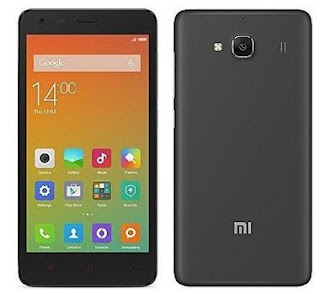
Tutorial / Cara Flashing Update Xiaomi Redmi Mi 2/2S karena mengalami Permasalahan Bootloop, HardBrick, Mati Total terjadi karena kerusakan software bisa di sebabkan oleh proses rooting yang salah atau penginstallan aplikasi yang membawa wallware dan virus yang mengakibatkan kinerja handphone tergangu, tapi selama masih terdeteksi computer atau driver anda masih bisa memperbaikinya dengan jalan install ulang firmware. atau kalau masih memungkin anda juga bisa melakukan recovery mode atau melakukan reset user data. tapi terkadang kerusakan tidak bisa di selesaikan dengan cara itu anda juga memerlukan update untuk memperbaharui firmware anda.
- Perlengkapan Tool untuk Flashing Update Xiaomi Redmi Mi 2/2S
- Smartphone Xiaomi Redmi Mi 2/2S
- Download Firmware Xiaomi Redmi Mi 2 / 2S
- Cable data ke komputer
- Batre minimala 50-70 percent
- Terakhir, Doa sodara-sodara
- Cara Flashing Update Stock Rom Firmware Xiaomi Redmi Mi 2/2S :
- Download dan Install driver usb Xiaomi di Computer Anda. Jika Usb driver sudah terinstall
- Download Stock Rom firmware (zip file) official Xiaomi smartphone anda
- Sambungkan Xiaomi Redmi Mi 2/2S anda ke Computer dan copy Stock Rom Firmware (zip File) ke memory internal Xiaomi anda. bukan memory card yah
- Setelah selesai mengcopy file zip ke dalam memory internal Xiaomi Redmi Mi 2/2S lepaskan sambungan dari Computer.
- Selanjutnya, Buka Tool di dalam folder dan pilih Updater
- Sekarang tekan tombol Menu di Xiaomi Redmi Mi 2/2S anda, dan pilih Installation File
- Selanjutnya Arahkan ke File Zip yang telah di copy di memory internal Xiaomi.
- Pilih update untuk melanjutkan Flashing
- Dan sekarang proses Update akan berjalan di perangkat Xiaomi anda.
- Setelah proses Update selesai, pilih reboot pada Xiaomi Redmi Mi 2/2S anda.
Available link for download
Monday, September 5, 2016
Installing Custom ROM ColorOS 2 1 0 Lollipop on Xiaomi Redmi 2
Installing Custom ROM ColorOS 2 1 0 Lollipop on Xiaomi Redmi 2
For a moment we forget the last post about camera bug on ZenUI ROM on Xiaomi Redmi. In this article we are going to share an article about how to install Custom ROM ColorOS 2.1.0 Lollipop on Xiaomi Redmi 2, we hope that this Lollipop version is better than before (KitKat version).
This ROM uses base of Android 5.1.1 Lollipop of Oppo Find 7. According to our opinion we prefer to choose KitKat version for the display, as we know ported ROM always has problems such as flashlight on notification panel and not all the feature can work properly such features on Gesture.
See also:
~ Cool Custom ROM Antares V3.0 Android L For Smartfren Andromax U LE
~ Custom ROM Asus Zenfone 5 For Smartfren Andromax C2 New AD688G
~ Custom ROM Sony Xperia Z Ultra For Evercoss Elevate Y A66A KitKat
~ Custom ROM Samsung Galaxy S5 For Evercoss A7T
~ Custom ROM Vibe 1.5 For Evercoss A7E
Screenshot:
 |
| Installing Custom ROM ColorOS 2.1.0 Lollipop on Xiaomi Redmi 2 |
Warning
- Following this article can void your warranty, and your warranty will be rejected.
- You Xiaomi Redmi 2 must be upgraded on MIUI 7 Lollipop version and installed TWRP 3.0.3
- All the result after you installed this ROM is not our responsibility
- All the mistake includes do not pay attention, read carefully etc are you own risk, and the result depends on what you are going to do
Steps to Install Custom ROM ColorOS 2.1.0 Lollipop on Xiaomi Redmi 2
- Once again we remind you “your Xiaomi Redmi 2 must be upgraded on MIUI 7 Lollipop and using TWRP 3.0.0”
- Download and install ROM file “ColorOS Redmi 2
- Log into TWRP by turn off your Redmi 2 and press volume up, volume down and power button simultaneously until MI logo appears there, then you may release those buttons
- Or to make it easier you can use Quick Reboot and select Reboot Recovery
- Select Wipe and wipe to Factory Reset
- And and then “install”
- Find and select ROM_ColorOS_Lollipop_Redmi2.zip you have downloaded
- Wait until flashing process is completed
- Last step, Reboot system
ROM ColorOS 2.1.0 Lollipop for Xiaomi Redmi 2
Download
Available link for download
How to flash stock rom huawei Y511 firmware Y511 U251
How to flash stock rom huawei Y511 firmware Y511 U251

Downlaod
Stock Huawei Ascend Y511-U251
Flash Tools
ROM Version: 4.2.2 Jelly Bean
Close your phone and usb connect to computer.
Available link for download
Download Kenbo O21s Stock Rom
Download Kenbo O21s Stock Rom

Learn how to flash / unbrick this device from here
Download Kenbo.O21s below
Kenbo.O21s Specs.
DISPLAY
-5.5 inches
CPU
-1.3 GHz
VERSION
-Android 5.0.x Lollipop
MEMORY
-16 GB, 2 GB RAM
CARD SLOT
-microSD, up to 64 GB
CAMERA
-8MP(Primary) , 5MP(Secondary)
BATTERY
-4000mAh
Mediatek
MT6572 Only
Kenbo.O21s.MT6582 Stock rom
Download Now
Available link for download
Download Lenovo A628t Firmware Stock rom
Download Lenovo A628t Firmware Stock rom

Download Lenovo A628t Firmware / Stock Rom FlashFile
Learn How to unbrick /Flash Lenovo A628t From Here
Learn How to unbrick /Flash Lenovo A628t From Here
Note: tips to note before flashing mtk Android phone click here
Make sure you are downloading the exact Rom
I will not take responsibility on whatever may happen to your device.because
flashing a wrong preloader, will make the device completely dead cant power on, cant charge and will not be detected by a computer
Lenovo A628t Quick Specs
Release date February 2014
Battery capacity (mAh) 2000
Removable battery Yes
SAR value NA
DISPLAY
Screen size (inches) 5.00
Touchscreen Yes
Resolution 480x854 pixels
HARDWARE
Processor 1.3GHz quad-core
Processor make MediaTek MT6582M
RAM 512MB
Internal storage 4GB
Expandable storage Yes
Expandable storage type microSD
CAMERA
Rear camera 5-megapixel
Flash Yes
Front camera 2-megapixel
Download Lenovo A628t Stock rom Below
Operating System Android 4.2
Mediatek MT6582
Lenovo_A628T_4.2.2
Download Now
Available link for download
Download Solo S450 Stock Rom
Download Solo S450 Stock Rom

Download Solo S450 Official Firmware
Learn How to flash/unbrick Solo S450 From here
Solo S450 Specs
Chipset
Dual Core MT6572 @1.3GHz, DSDS
Memory
16GB eMMC ROM + 1GB RAM
Dimension
131.5 x 66.5 x 10.5 mm
Network
GSM/EDGE: 850/900/1800/1900
WCDMA: 900 /2100
Display
4.5" FWVGA IPS display
Features / Interface
3.5mm audio jack
Micro USB
Micro SD Card slot
Bluetooth , WIFI
GPS/AGPS
G-sensor, Proximity and Light sensor
Camera
5MP Main + VGA Front
(Adv. Imaging Support )
Other
Premium headset & case included.
Battery Size
1800 mAh
Solo S450 Stock Rom
OS/UI
Android 4.2.4
MT6572
SMPX_S450_V01.36
Download Now
What Kind of Firmware do you need requests from comment box ..
Available link for download
Download Collection of Innjoo Stock Rom
Download Collection of Innjoo Stock Rom

Collection of Innjoo Stock Rom
flash this device using sp flash tool Learn here
verry important: tips to note before flashing mtk android phone click here
Make sure you are downloading the exact Rom
I will not take responsibility on whatever may happen to your device.because
flashing a wrong preloader, will make the device completely dead cant power on, cant charge and will not be detected by a computer
INNJOO STOCK ROM
Innjoo Fire
download
Innjoo Fire Plus
download
Innjoo Fire Pro
download
Innjoo F1
download
Innjoo F2
download
Innjoo F2 vii Flash using WiseLink Tool
download
Innjoo Halo
download
Innjoo i1
download
Innjoo i1k
download
Innjoo i1s
download
Innjoo i2
download
Innjoo i2s
download
Innjoo Max 2 3G
download
Innjoo Max 2 Plus 3G
download
Innjoo Note
download
Innjoo Note E
download
Innjoo Note Pro
download
Innjoo One 3G
download
Innjoo One LTE
download
Innjoo T1 V1
download
Innjoo T1 V2
download
Available link for download
Sunday, September 4, 2016
Download X BO M8 Stock Rom Firmware
Download X BO M8 Stock Rom Firmware

Download x-bo m8 stock rom / firmware below
Learn how to flash /unbrick x-bo m8 here
X-BO M8 ROM
Htc.M8 Clone.MT6572
Download
M8 CLONE Android 4.2 MT6572
Download
Install ROM:
- Unpack FlashTools, and Click on Flash_tool.exe
- Select "scatter-Loading" and search MT6572_Android_scatter.txt in ROM
- Wait file to be added into Flash Tool
- Select "Download Only" or if upgrade "Firmware upgrade"
- Turn off your phone, remove the battery (if the battery is removable) and replace it after some seconds (and dont turn on the phone).
- Select "scatter-Loading" and search MT6572_Android_scatter.txt in ROM
- Wait file to be added into Flash Tool
- Select "Download Only" or if upgrade "Firmware upgrade"
- Turn off your phone, remove the battery (if the battery is removable) and replace it after some seconds (and dont turn on the phone).
- Press “Download” button to start
- and connect your phone into the computer via USB data cable.
- The process will start and a red progress bar will appear after color purple, yellow.
- And green circles display
- Finish !
- and connect your phone into the computer via USB data cable.
- The process will start and a red progress bar will appear after color purple, yellow.
- And green circles display
- Finish !
- You can now safely disconnect your phone and turn it on.
Available link for download
Download iTEL 1551 Stock Rom
Download iTEL 1551 Stock Rom
Download iTEl iT1551 Pac File

Learn how to flash/unbrick iTEL 1551 From Here
iTel it1551 Full Specifications
General Information
2G Network GSM 850 / 900 / 1800 / 1900
3G Network HSDPA 900 / 2100
4G Network None
SIM Dual micro SIM
Status Available 2016
Body
Dimensions 156*80*9.4mm
Keyboard Touchscreen
Colors Black, Silver, Gold
Cover Metal
Display
Type IPS capacitive, multi-touch touchscreen with 16,000,000 colors
Size 5.5 inches, 480*854
Memory And OS
Card slot MicroSD, up to 32GB
Internal 8GB
OS Android 5.1 Lollipop
Processors Quad-Core CPU
RAM 512MB
Audio
Alert types Vibration, MP3 ringtones
Loudspeaker Yes
Audio port 3.5mm jack
Connectivity
2G GPRS – up to 32 to 48 kbps; EDGE – up to 236.8 kbps
3G Up to 42 mbps downink; Up to 5.76 mbps uplink
4G Not Available
WIFI Wi-Fi 802.11 b/g/n, Wi-Fi hotspot, DLNA, Wi-Fi Direct
Bluetooth Version 4.0
GPS A-GPS
NFC No
USB MicroUSB v2.0
Camera
Primary
5.0MP
Video
Secondary 2MP
Battery
Capacity 2400mAh Li-ION battery
Stand-by
Talk time
Music play
Other Features
Sensors Accelerometer, Proximity, GPS
Messaging SMS, MMS, Email, Push Mail, IM
Browser HTML5
Java No
Miscellaneous – Active noise cancellation with dedicated mic
– MP3/WAV/eAAC+/WMA player
– FM Radio
– MP4/H.264/H.263/WMV player
– Document viewer/editor
iTEL iT1551 Stock Rom
Android 5.1
SC7731
IT1551-W503-20160628_Release
Download Now
Available link for download
Custom ROM Miui V5 4 10 21 KitKat 4 4 4 For Samsung Galaxy S III Mini
Custom ROM Miui V5 4 10 21 KitKat 4 4 4 For Samsung Galaxy S III Mini
 |
| Custom ROM Miui V5 4.10.21 KitKat 4.4.4 For Samsung Galaxy S III Mini |
AnyIndo - In this article we are going to share an article it is Custom ROM MiuiV5 4.10.21 KitKat 4.4.4 For Samsung Galaxy S III Mini. Hello guys, we realize that we have never created any article about Samsung Galaxy III Mini, and by this article we want to prove that we dont forget this android device.
There are a lot of people want Miui ROM on their android device although their device isnt Xiaomi. And the best way to do it is installing custom ROM like what we want to discuss in this article. This custom ROM. There are some new features you get if you install this custom ROM on your Galaxy S III Mini,lets check this our its features:
Features:
- Miui version 4.10.21
- CM11 4.4.4 KitKat based
- OC kerneld builded for Miui use
- SElinux disabled
- f2fs support
- Aroma installer
- All Miui features present
- Playstore included
- Multi Language
- Lots of features added
We apologize to all Galaxy S III Mini user because we just give this custom ROM without give the instruction to install it, But you can install this custom ROM easily like CM11. Just find our the other article about how to install CM11. for f2fs you need recovery to finish it which support f2fs.
File:
Custom ROM Miui V5 - Download
Information:
Name: Miui V5 4.10.21 KitKat 4..4.4
Status : Stable
Current version: 4.10.21
Created: 01.01.2015
Credit:
- PolishVodak for helping this all the time, most credits goes tohim
- Novafusion for CM11 4.4.4
- Tequetski for same advices
- 12345a67890b for port base
- Miui porting team
Special Thanks to:
galaxy mini (senior member of xda developer)
source: xda
Available link for download
Download iPHONE 6 Clone MT6572 Stock Rom
Download iPHONE 6 Clone MT6572 Stock Rom

Download iPHONE 6 Clone Stock Rom Below
LEARN HOW TO FLASH/UNBRICK THIS DEVICE FROM HERE
verry important: tips to note before flashing android phone click here
Make sure you are downloading the exact Rom
I will not take responsibility on whatever may happen to your device.because
flashing a wrong preloader, will make the device completely dead cant power on, cant charge and will not be detected by a computer.
ROM iPHONE 6 Clone MT6572 Firmware Download
ONLY MT6572
iPhone_6_MT6572_iOS8_ALPS.JB3.MP.V1
Download Now
Step To Flash :
Open FlashTools, and Click on Flash_tool.exe
Select "scatter-Loading" and search MT6580_Android_scatter.txt in ROM
Wait file to be added into Flash Tool
Select "Download Only" or if upgrade "Firmware upgrade"
Turn off your phone, remove the battery (if the battery is removable) and replace it after some seconds (and dont turn on the phone).
Press “Download” button to start
and connect your phone into the computer via USB data cable.
The process will start and a red progress bar will appear after color purple, yellow.
And green circles display
Finish !
You can now safely disconnect your phone and turn it on
Available link for download
Saturday, September 3, 2016
Download LG G3 Firmware Stock Rom
Download LG G3 Firmware Stock Rom
Download Lg G3 stock rom
Learn how to flash this devices here

PLATFORM OS Android OS, v4.4.2 (KitKat), upgradable to v6.0 (Marshmallow)
Chipset Qualcomm MSM8975AC Snapdragon 801
CPU Quad-core 2.5 GHz Krait 400
GPU Adreno 330
Versions:
LG G3 VS985 for Verizon
LG G3 LS990 for Sprint
NETWORK Technology GSM / CDMA / HSPA / EVDO / LTE
BODY Dimensions 146.3 x 74.7 x 8.9 mm (5.76 x 2.94 x 0.35 in)
Weight 149.7 g (5.29 oz)
SIM Micro-SIM
DISPLAY Type True HD-IPS + LCD capacitive touchscreen, 16M colors
Size 5.5 inches (~75.2% screen-to-body ratio)
Resolution 1440 x 2560 pixels (~538 ppi pixel density)
Multitouch Yes
Protection Corning Gorilla Glass 3
MEMORY Card slot microSD, up to 128 GB (dedicated slot)
Internal 32 GB, 3 GB RAM
CAMERA Primary 13 MP, phase detection/laser autofocus, OIS, dual-LED (dual tone) flash
Features 1/3" sensor size, geo-tagging, touch focus, face/smile detection, panorama, HDR
Video 2160p@30fps, 1080p@30fps, HDR, stereo sound rec.
Secondary 2.1 MP, 1080p@30fps
SOUND Alert types Vibration; MP3, WAV ringtones
Loudspeaker Yes
3.5mm jack Yes
- Dolby mobile
COMMS WLAN Wi-Fi 802.11 a/b/g/n/ac, dual-band, Wi-Fi Direct, DLNA, hotspot
Bluetooth v4.0, A2DP, LE, aptX
GPS Yes, with A-GPS/ S-GPS (VS985)
NFC Yes
Infrared port Yes
Radio FM radio (LS990 model)
USB microUSB v2.0 (SlimPort), USB Host
FEATURES Sensors Accelerometer, gyro, proximity, compass
Messaging SMS(threaded view), MMS, Email, Push Mail, IM
Browser HTML5
Java No
- Active noise cancellation with dedicated mic
- MP4/DviX/XviD/H.264/WMV player
- MP3/WAV/FLAC/eAAC+/WMA player
- Photo viewer/editor
- Document viewer
- Voice memo/dial/commands
BATTERY Removable Li-Ion 3000 mAh battery
Stand-by Up to 415 h (3G)
Talk time Up to 18 h 40 min (3G)
MISC Colors Metallic Black, Silk White (Verizon), Shine Gold (Sprint)
Learn how to flash this devices here
AT&T D850
Lollipop
LGD850AT-01-V10d-310-410-JUN-19-2014.zip
LGD850.dll1
Verizon VS985
Marshmallow Android 6.0
LGVS985_20140620_LGFLASHv160.dll1
Verizon VS98524B_01.kdz
VS98510B_03.zip
T-Mobile D851
Marshmallow 6.0
D85110C_00.7z
D85110M_00.7z
D85110R_00.kdz
LGD851AT-01-V10c.zip
LGD851.dll1
Sprint LS990
Lolipop
LGLS990_20140704.dll1
LS990ZV4_04.51101.zip
LS990ZV4_04.51101.zip
LG G3 specs
Chipset Qualcomm MSM8975AC Snapdragon 801
CPU Quad-core 2.5 GHz Krait 400
GPU Adreno 330
Versions:
LG G3 VS985 for Verizon
LG G3 LS990 for Sprint
NETWORK Technology GSM / CDMA / HSPA / EVDO / LTE
BODY Dimensions 146.3 x 74.7 x 8.9 mm (5.76 x 2.94 x 0.35 in)
Weight 149.7 g (5.29 oz)
SIM Micro-SIM
DISPLAY Type True HD-IPS + LCD capacitive touchscreen, 16M colors
Size 5.5 inches (~75.2% screen-to-body ratio)
Resolution 1440 x 2560 pixels (~538 ppi pixel density)
Multitouch Yes
Protection Corning Gorilla Glass 3
MEMORY Card slot microSD, up to 128 GB (dedicated slot)
Internal 32 GB, 3 GB RAM
CAMERA Primary 13 MP, phase detection/laser autofocus, OIS, dual-LED (dual tone) flash
Features 1/3" sensor size, geo-tagging, touch focus, face/smile detection, panorama, HDR
Video 2160p@30fps, 1080p@30fps, HDR, stereo sound rec.
Secondary 2.1 MP, 1080p@30fps
SOUND Alert types Vibration; MP3, WAV ringtones
Loudspeaker Yes
3.5mm jack Yes
- Dolby mobile
COMMS WLAN Wi-Fi 802.11 a/b/g/n/ac, dual-band, Wi-Fi Direct, DLNA, hotspot
Bluetooth v4.0, A2DP, LE, aptX
GPS Yes, with A-GPS/ S-GPS (VS985)
NFC Yes
Infrared port Yes
Radio FM radio (LS990 model)
USB microUSB v2.0 (SlimPort), USB Host
FEATURES Sensors Accelerometer, gyro, proximity, compass
Messaging SMS(threaded view), MMS, Email, Push Mail, IM
Browser HTML5
Java No
- Active noise cancellation with dedicated mic
- MP4/DviX/XviD/H.264/WMV player
- MP3/WAV/FLAC/eAAC+/WMA player
- Photo viewer/editor
- Document viewer
- Voice memo/dial/commands
BATTERY Removable Li-Ion 3000 mAh battery
Stand-by Up to 415 h (3G)
Talk time Up to 18 h 40 min (3G)
MISC Colors Metallic Black, Silk White (Verizon), Shine Gold (Sprint)
Available link for download
Subscribe to:
Posts (Atom)