Showing posts with label feature. Show all posts
Showing posts with label feature. Show all posts
Thursday, September 1, 2016
Collection OF iTEL Feature Phone FlashFile Firmwares
Collection OF iTEL Feature Phone FlashFile Firmwares
Download iTEL Feature Phones
Make sure you are downloading the exact Flashfile
9jarom will not take responsibility on whatever may happen to your device.because
flashing a wrong Firmware, will make the device completely dead cant power on, cant charge and will not be detected by a computer.
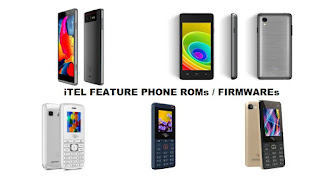
Download iTEL Feature Phone Official Firmware Below
Learn How to remove Password On iTEL Feature Phone From here
Learn How to Flash iTEL feature phone below or from here
iT2020
iT2030
iT2050
iT2060
iT2070
iT2070 Bin
iT230
iT2500
iT2510
iT2520
iT2530
iT2550
iT2550 vii
iT3120
iT3140
iT3610
iT3620
iT3660
iT3680
iT5100
iT5120
iT5130
iT5131
iT5150
iT5150 vii
iT5160
iT5210
iT6100
iT6200
iT6200 vii
iT6300
iT6400
iT6500
iT6600
iT6700
iT2060
iT5610
iT2100
iT2080
iT5620
iT2020 vii
iT2090
iT2560
iT5010
iT5160 vii
iT5180
iT5190
iT6800
iT5220
Flash Tutorial:click here
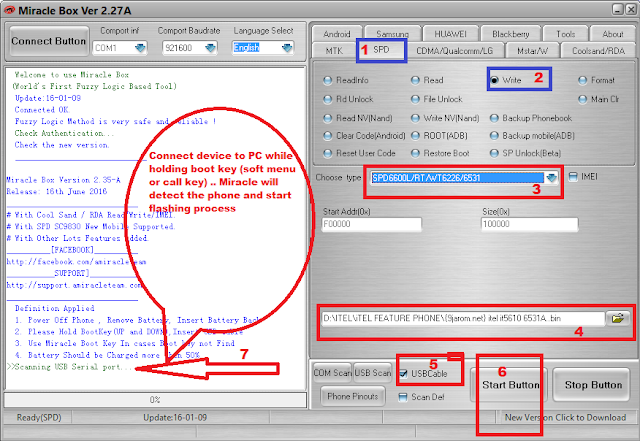
How to flash iTEL Feature phones with .bin file using Miracle Box below >>
Launch Miracle Box
Click on SPD tab
Tick Write
Under Choose type, Select the chip of the device you want to flash {6531 xxxx}
Click the small yellow folder
Navigate to the ROM/Firmware folder and select the bin file
Click Start button
You will see Scanning USB Serial port...
Connect device to PC while holding boot key (soft menu or call key)
Miracle will detect the phone and start flashing process
When you see Done! Flashing process is complete
Disconnect and boot up phone
Available link for download

Wednesday, August 17, 2016
PhoenixSuit Ver 1 10 Released with new feature free download here
PhoenixSuit Ver 1 10 Released with new feature free download here
PhoenixSuit Ver 1.10 Released with new feature free download here
PhoenixSuit Ver 1.10 screenshot:

New Update PhoenixSuit Ver 1.10 released with new feature, this is very use full tool for all winner tablet for flash it is very easy tool you can do flash without any risk some tablet for flash no required any boot key just attach tablet and click on update button you are done its very simple and also many feature in this tool and you can flash manual flash if you want to just recovery install then just untick all without Recovery then click on upgrade button you are done from recovery flash, and remember must first check your device will be hardware issue after connect with this tool some time that to be issue and after try to flash then your tablet will be dead or other issue if hardware related issue so please carefully use this tool and following this tutorial.
PhoenixSuit Ver 1.10 Download from here
Available link for download
Monday, August 15, 2016
Tutorial How To Flash iTEL Feature Phonez Using Miracle Box
Tutorial How To Flash iTEL Feature Phonez Using Miracle Box
How To Flash iTEl Feature Phone Using Miracle Box
This a tutorial on how to flash itel feature phone using miracle box
Requirment :
- Miracle box or Any other Chinese Tools
- SPD Feature PhoneS
- USB CABLE
- Computer
- Brain
Flash Tutorial:
How to flash iTEl devices with .pac file using researchdownload & UpgradeDownload Tool.
click here
How to flash iTEL Feature phones with .bin file using Miracle Box below >>
Launch Miracle Box
Click on SPD tab
Tick Write
Under Choose type, Select the chip of the device you want to flash {6531 xxxx}
Click the small yellow folder
Navigate to the ROM/Firmware folder and select the bin file
Click Start button
You will see Scanning USB Serial port...
Connect device to PC while holding boot key (soft menu or call key)
Miracle will detect the phone and start flashing process
When you see Done! Flashing process is complete
Disconnect and boot up phone
Picture Guide .

Available link for download
Subscribe to:
Posts (Atom)