Showing posts with label unlocking. Show all posts
Showing posts with label unlocking. Show all posts
Friday, September 2, 2016
O 8 52 Unlocking Using Sigma Box
O 8 52 Unlocking Using Sigma Box
Heres the way you can unlock your O+ 8.52 to any SIM Provider in your Country!
Prerequisite:
Procedure
1. Open SigmaKey then choose MTK as the platform
2. Turn-off the phone and insert usb cable while pressing power switch
it should be stuck on o+ logo.
3. Choose correct comport , press Direct Unlock then wait for a seconds and your done

Prerequisite:
- Mini USB Cable
- PC
- Sigma Box
Procedure
1. Open SigmaKey then choose MTK as the platform
2. Turn-off the phone and insert usb cable while pressing power switch
it should be stuck on o+ logo.
3. Choose correct comport , press Direct Unlock then wait for a seconds and your done
Available link for download

Thursday, September 1, 2016
SM J110H Unlocking Procedures
SM J110H Unlocking Procedures
Heres How to unlock SM-J110H on service Provider.
First thing first,Lets check the Specifications of this Smartphone.This smartphone is from Saudi Arabia and made by Samsung..
SM-J110H Keys Specs:
How To Unlock using Octopus Box Software:
1. Power on the phone.
2. Tap 7 times on Build number in Settings-About phone to enable Developer options,
go to Settings-Developer options and enable USB debugging.
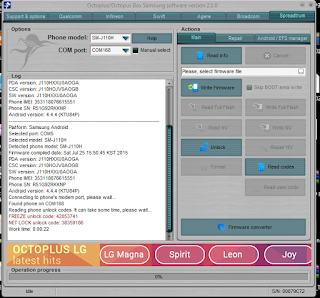
3.Open Octopus Box Samsung Software
4.Select Spreadtrum
5.Select SM-J110H
6. Connect the phone to PC with USB cable, install drivers if needed.
7. Press Unlock button for direct unlock or Read codes to read security codes.
First thing first,Lets check the Specifications of this Smartphone.This smartphone is from Saudi Arabia and made by Samsung..
SM-J110H Keys Specs:
- 4.3-inch display, at 216 ppi / dpi (pixels per inch)
- 1.3GHz 2-core processor
- 0.512GB RAM
- 4GB internal memory
- 5 Megapixel main camera
- 1800-mAh battery
- Android 4.4 KitKat
How To Unlock using Octopus Box Software:
1. Power on the phone.
2. Tap 7 times on Build number in Settings-About phone to enable Developer options,
go to Settings-Developer options and enable USB debugging.
3.Open Octopus Box Samsung Software
4.Select Spreadtrum
5.Select SM-J110H
6. Connect the phone to PC with USB cable, install drivers if needed.
7. Press Unlock button for direct unlock or Read codes to read security codes.
Available link for download
Tuesday, August 30, 2016
Huawei Y600 U20 Unlocking Procedures
Huawei Y600 U20 Unlocking Procedures
Heres How you can unlock your Huawei Y600-U20 to any sim provider using Sigma Box Software.
Note:Download the drivers of your from here.
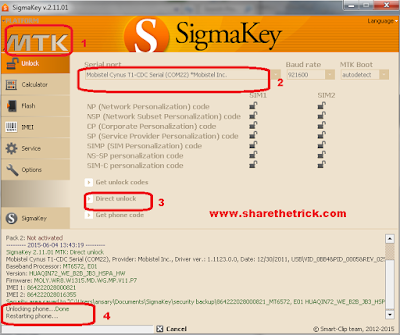
Select "MTK" platform from the tab menu in the upper left side of the software
Go to "Unlock" tab
Turn-Off the phone
Connect turned off phone to PC with USB cable
Install the drivers
Select Mobistel Cynus T1-CDC Serial in the ports selection tab
Press "Direct Unlock" button
Message "Unlocking phone... Done" indicates that procedure was completed successfully
Disconnect the handset. Remove and reinstall the battery
Note:Download the drivers of your from here.
Select "MTK" platform from the tab menu in the upper left side of the software
Go to "Unlock" tab
Turn-Off the phone
Connect turned off phone to PC with USB cable
Install the drivers
Select Mobistel Cynus T1-CDC Serial in the ports selection tab
Press "Direct Unlock" button
Message "Unlocking phone... Done" indicates that procedure was completed successfully
Disconnect the handset. Remove and reinstall the battery
Available link for download
Sunday, August 21, 2016
SM G530H Samsung Galaxy Grand Prime Unlocking Using Z3X Box
SM G530H Samsung Galaxy Grand Prime Unlocking Using Z3X Box
Below is the unlocking instructions of Samsung Galaxy Grand Prime using Z3X Box Software.
Very simple and easy!
UNLOCK INSTRUCTIONS:
Micro-USB cable:
1. Phone must be powered on.
2. Type *#0808# and select DM+MODEM+ADB.
3. Type *#9090# and choose DM/DUN over HSIC.
4. Reboot phone.
5. Connect USB cable, install drivers if needed.
6. Select Samsung diagnostic port in port settings.
7. Press Unlock button for direct unlock.

Very simple and easy!
UNLOCK INSTRUCTIONS:
Micro-USB cable:
1. Phone must be powered on.
2. Type *#0808# and select DM+MODEM+ADB.
3. Type *#9090# and choose DM/DUN over HSIC.
4. Reboot phone.
5. Connect USB cable, install drivers if needed.
6. Select Samsung diagnostic port in port settings.
7. Press Unlock button for direct unlock.
Available link for download
Samsung Unlocking FREE Tools
Samsung Unlocking FREE Tools
Samsung Unlocking FREE Tools
Yahoo! Messenger
mr.raja51@yahoo.com
any poblem call
01734481844
Without Password

- he latest setup of brilliant Samsung flashing tool have been released and free downloading link is available for download. This brilliant software allows you to flash your Samsung mobiles without flashing box via USB data cable. Today everything we do is involved with some sort of application we utilize, from organizing our daily lifestyle to enjoyment & productivity it all revolves around applications. Keep in mind there are various types of apps, web apps, hybrid apps & like the majority, “native apps”, are those we have on our devices home screen. If you have an enough experience in flashing or unlocking you can flash your mobiles with this brilliant software at your home in very short time. First of all you will need to download latest setup of flashing tool then install it on your PC. Now connect your mobile with compatible USB data cable. If your phones firmware has corrupted or outdated you will need to complete flash your phone with its latest flash files.
download link now
Available link for download
Saturday, August 20, 2016
Samsung Galaxy Note 5 SM N920C Unlocking Using Z3X Pro with Android Version 5 1 1
Samsung Galaxy Note 5 SM N920C Unlocking Using Z3X Pro with Android Version 5 1 1
These are the steps that you should follow to unlock your Samsung Galaxy Note 5 (SM-N920C).
Prerequisites:
1) To get started, take a complete backup of personal data in your smartphone using Samsung Kies or using similar application.
2) Next, download Samsung Galaxy Note 5 driver and install it in your computer. Only by installing USB driver, you will be able to connect your smartphone with the computer successfully.
3) Now you will need to enable Developer Options in your device by following this path: Settings -> About Phone -> Build Number (tap on it for 5-7 times). Once enabled, you will need to enable “OEM Unlocking” by following this path: Settings -> Developer Options -> OEM Unlocking (enable it for allowing the bootloader to be unlocked).
4) Make sure that your device has at least 50-60% battery backup in it before getting started with the rooting procedure. Also, ensure that you have disabled antivirus as they tend to interrupt the rooting procedure.
5.Z3X Samsung Tool PRO
Once you have finished all these prerequisites, you can move forward to the rooting and Unlocking tutorial given below.
For Rooting this device follow this Procedure>Tutorial To Root Samsung Galaxy Note 5:
Unlocking This Device
1.Open Z3X Samsung Tool PRO
2.Connect your device using USB Cable
3.Select Correct Unit
4.Select Unlock in the Tab
5.Select ADB in the Port
6.Now,Click Read Codes
7.Restart your Phone and Manually put generated codes in the device.

Prerequisites:
1) To get started, take a complete backup of personal data in your smartphone using Samsung Kies or using similar application.
2) Next, download Samsung Galaxy Note 5 driver and install it in your computer. Only by installing USB driver, you will be able to connect your smartphone with the computer successfully.
3) Now you will need to enable Developer Options in your device by following this path: Settings -> About Phone -> Build Number (tap on it for 5-7 times). Once enabled, you will need to enable “OEM Unlocking” by following this path: Settings -> Developer Options -> OEM Unlocking (enable it for allowing the bootloader to be unlocked).
4) Make sure that your device has at least 50-60% battery backup in it before getting started with the rooting procedure. Also, ensure that you have disabled antivirus as they tend to interrupt the rooting procedure.
5.Z3X Samsung Tool PRO
Once you have finished all these prerequisites, you can move forward to the rooting and Unlocking tutorial given below.
WARNING: I should not be held responsible for any damages happens to your device while following this rooting procedure. Also, rooting will void your warranty as well. So, beware of these things before getting started with the tutorial given below.
For Rooting this device follow this Procedure>Tutorial To Root Samsung Galaxy Note 5:
Unlocking This Device
1.Open Z3X Samsung Tool PRO
2.Connect your device using USB Cable
3.Select Correct Unit
4.Select Unlock in the Tab
5.Select ADB in the Port
6.Now,Click Read Codes
7.Restart your Phone and Manually put generated codes in the device.
Thats It!!!
Any Questions???Use the comment System Below!!!
Available link for download
Saturday, August 13, 2016
Lenovo A536 Unlocking Steps
Lenovo A536 Unlocking Steps
Heres the steps you can follow to unlock your Lenovo A536 from any sim providers.Just follow this simple steps to do it.
Note:Do this at your own risk,we are not liable what ever happen to your Smartphone!
Procedures:
1.Turn-OFF Lenovo A536
2.Insert sim1 slot any sim that is locked to like smart/sun/tnt and put your Globe sim to sim2 slot.
3.Now,Turn-On your phone
4.Now,if asking for simmie lock code,just type 12345678 to unlock your phone.But,sadly to say,this is just temporary.if you turn-off your phone and turn-on again it will ask again for the code.if you want to unlock it permanently proceed to next steps.
5.To unlock it permanently,Dial this number *#*#3646633#*#* to go Engineering Mode.
6.Scroll down below to find simme lock then click it and select Network Personalization and select Unlock Permanently then just put the code which is 12345678.

7.Thats It,Your smartphone now is Permanently Unlock to any Sim Providers..
Any Questions???Just use comment system below!!!
Note:Do this at your own risk,we are not liable what ever happen to your Smartphone!
Procedures:
1.Turn-OFF Lenovo A536
2.Insert sim1 slot any sim that is locked to like smart/sun/tnt and put your Globe sim to sim2 slot.
3.Now,Turn-On your phone
4.Now,if asking for simmie lock code,just type 12345678 to unlock your phone.But,sadly to say,this is just temporary.if you turn-off your phone and turn-on again it will ask again for the code.if you want to unlock it permanently proceed to next steps.
5.To unlock it permanently,Dial this number *#*#3646633#*#* to go Engineering Mode.
6.Scroll down below to find simme lock then click it and select Network Personalization and select Unlock Permanently then just put the code which is 12345678.
7.Thats It,Your smartphone now is Permanently Unlock to any Sim Providers..
Any Questions???Just use comment system below!!!
Available link for download
Huawei Ascend Y360 U31 Unlocking
Huawei Ascend Y360 U31 Unlocking
Heres How you can unlock your Huawei Ascend Y360-U31 using NCK Dongle.
Very easy if you have NCK Dongle or NCK Box Software.
Open NCKDongle AnroidMTK 2.5.6.2
Select Huawie and correct unit
Now,click unlocking tab
Must select META Mode
Then,Click Direct Unlock
Connect your phone to PC using USB Mini Cable.(must be off)
Wait until Finish

Very easy if you have NCK Dongle or NCK Box Software.
Heres How:
Open NCKDongle AnroidMTK 2.5.6.2
Select Huawie and correct unit
Now,click unlocking tab
Must select META Mode
Then,Click Direct Unlock
Connect your phone to PC using USB Mini Cable.(must be off)
Wait until Finish
Available link for download
Subscribe to:
Posts (Atom)