Saturday, September 10, 2016
Root Lenovo S850 Via vRoot
Root Lenovo S850 Via vRoot
 |
| Root Lenovo S850 Via vRoot |
There are many people don’t really know the advantage and disadvantage of rooting, but many result about rooting on Google search. It means rooting is something important for android user if they want to mess up their android device.
In this chance, AnyIndo will discuss about How to root Lenovo S850 via iRoot. For those who have Lenove S850 device and want to root via iRoot, let’s read and follow this article carefully to get the best result:
Warning:
Make sure the battery has 60%.
Prepare USB cable to connect your device to PC.
Steps:
- Download Lenovo Driver to your PC, or you can install factory driver from its device.
- Activate USB Debugging, it is go to Settings > Developer Options > checklist USB Debugging.
- Download vRoot application, and then install it on your PC.
- Open vRoot application.
- Synchronize Lenovo S850 to PC via USB cable.
- If it is has been detected it means on vRoot application will detected your device Lenovo S850.
- Press Root button on the bottom with green color.
- Wait until rotting process is completed.
- If it is finish, unplug your device from PC.
- Due to the reason that root manager is chinese, you have to install Supersu application. You can find it on Google Play
- If you already get supersu, install and run the application. If there is a notif to update binary, press Yes. And there will a question to delete root manager, press Yes.
- Done
Note:
Make sure you have internet connection because you need to download all the file bellow:
Files:
Driver Lenovo S850 - Download
vRoot - Download
Available link for download

Tutorial Flash Mito Fantasy A18 Via SP Flashtool
Tutorial Flash Mito Fantasy A18 Via SP Flashtool

- Berikut persiapan sebelum melakukan Flash Mito Fantasy A18 :
- Flashtool Versi 5
- Mtk droid tool and root
- MT65xx usb driver
- MT6577 usb vcom driver
- Stock Rom Firmware Mito Fantasy A18
Tutorial :
- Install Driver
- Extrak Stock Firmware Mito Fantasy A18
- Jalankan Flashtool.exe
- Pada Scatter Loading file, arahkan ke file scatter yang terdapat di stock rom yang tadi di pilih download dan sudah diextrak pake winrar tadi
- Preloader jangan di centang
- Klik download pada SP flash Tool
- Matikan Mito Fantasy A18, lalu hubungkan ke komputer dengan kabel usb
- Tunggu proses loading jalan di Flashtool hingga ada lingkaran hijau tanda Selesai.
Berikut Tutorial Lengkap : Cara Flashing Mediatek Menggunakan FlashTool
Available link for download
Cara Flashing Update Coolpad Note3 Via Flashtool
Cara Flashing Update Coolpad Note3 Via Flashtool
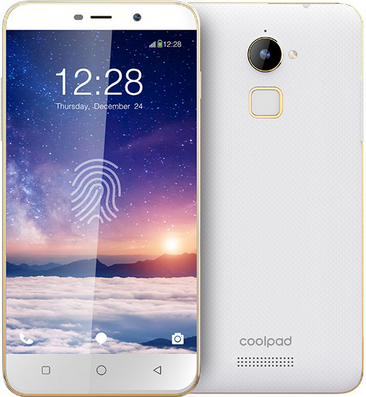
Tutorial / Cara Flashing Update Coolpad Note3 menggunakan SP Flashtool. Permasalahan Bootloop, HardBrick, Mati Total terjadi karena kerusakan software bisa di sebabkan oleh proses rooting yang salah atau penginstallan aplikasi yang membawa wallware dan virus yang mengakibatkan kinerja handphone tergangu, tapi selama masih terdeteksi computer atau driver anda masih bisa memperbaikinya dengan jalan install ulang firmware. atau kalau masih memungkin anda juga bisa melakukan recovery mode atau melakukan reset user data. tapi terkadang kerusakan tidak bisa di selesaikan dengan cara itu anda juga memerlukan update untuk memperbaharui firmware anda.
- Berikut Bahan sebelum melakukan Flashing Coolpad Note3
- Flashtool Versi 5
- Mtk droid tool and root
- MT65xx usb driver
- MT6577 usb vcom driver
- Stock Rom Firmware Coolpad Note3
- Install Driver
- Extrak Stock Rom / Firmware Coolpad Note3
- Jalankan Flashtool.exe
- Pada Scatter Loading file, arahkan ke file scatter yang terdapat di stock rom yang tadi di pilih download dan sudah diextrak pake winrar tadi
- Preloader jangan di centang
- Klik download pada SP flash Tool
- Matikan / turn off Coolpad Note3, lalu hubungkan ke komputer dengan kabel usb
- Tunggu proses loading jalan di di Flashtool hingga ada lingkaran hijau tanda Selesai.
Tutorial Lengkap Bisa di lihat disini : Cara Flash MTK Menggunakan FlashTool
Available link for download
Huawei Kestrel EE G535 L1 Root And Unlock
Huawei Kestrel EE G535 L1 Root And Unlock
I want to share How to root and unlock Huawei Kestrel EE G535-L1.Before you can unlock the Huawei Kestrel EE G535-L1 using SigmaKey Box Software to its SIM provider you must root first the phone using iRoot.
Now,Proceed to unlocking using Sigmakey Box Software

How to Root Huawei Kestrel EE G535-L1 using iRoot
- Download and Install iRoot in your PC
- Open iRoot Software
- Connect Your phone to the USB Cable and wait until detected by iRoot
- After fully detected by iRoot,Click the root button
- Wait now until root process success and your phone will automatically reboot
 |
| Successfully Rooted |
Now,to make sure you have successfully rooted your Huawei Kestrel EE G535-L1,Open applications menu on your Huawei Kestrel EE G535-L1 and find SuperUser App.If this app exist on your phone then it means you have successfully rooted your device.Congratulations.
 |
| SuperUser |
Now,Proceed to unlocking using Sigmakey Box Software
How To Direct Unlock Huawei Kestrel EE G535-L1
- Open SigmaKey Box
- Select ADB in Platform
- Select Composite ADB Interface in Serial Port
- Press Direct Unlock
- Wait Until Finish
Dont Forget to Like Us on Facebook,Follow us on Google+
Available link for download
The Easiest Methods to Root SAMSUNG Galaxy S5 Without PC
The Easiest Methods to Root SAMSUNG Galaxy S5 Without PC
 |
| The Easiest Methods to Root SAMSUNG Galaxy S5 (Without PC) |
Hello guys, today we are going to guide you in this article it is about how to root SAMSUNG Galaxy S5 with 2 methods and according to our experience these methods are easy enough if you read and follow our instruction carefully. If most of tutorial on Google require PC access, in this article we do not use any PC to root your device.
How to root samsung galaxy S5 is easy way and without PC / Laptop, it is by using Towelroot application and if you think rooting via PC is the best way there are also way root using a PC / Laptop using tools CF Auto Root. Heres how to root Galaxy S5:
How to root SAMSUNG Galaxy S5 via Towelroot
- Before install any application we provide you have to enable (activate) "Unknown sources" first, it is Settings > Security > Device administrators
- Download and install Towelroot
- Run Towelroot application on your Galaxy S5
- Wait until the process is completed
- Install and update SuperSU
- Install Root checker to check whether your device has been rooted or not
- Done, congrats ! your Galaxy S5 has been rooted successfully via Towelroot
Isnt it easy enough, right? but if youre still getting confused you are free to ask us about this article. Just leave comment below and when one of our team is online they will answer and reply yoour question. Thanks
Towelroot
SuperSU
Root checker
Available link for download
Subscribe to:
Posts (Atom)